Lost Your Motorola Phone? How to Find, Lock or Erase It
If your Motorola phone is lost or stolen, Google’s Find Hub (formerly Find My Device) can show it on a map, make it ring, lock it or erase it. It only works if it was turned on before the phone went missing — so check it now.
Turn on Find Hub (Find My Device)
-
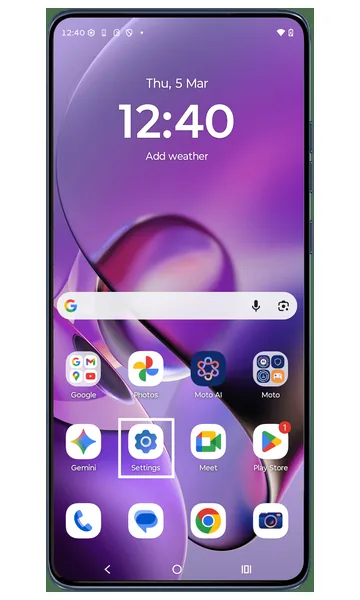 Step 1
Open Settings
Open the Settings app on your Motorola phone.
-
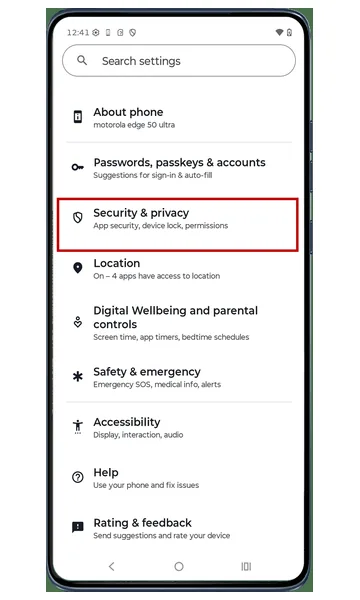 Step 2
Tap Security & privacy
Scroll through the settings and tap Security & privacy.
-
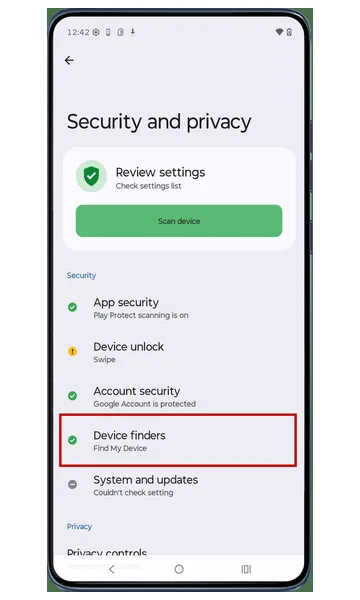 Step 3
Tap Device finders
In Security & privacy, tap Device finders (Find My Device).
-
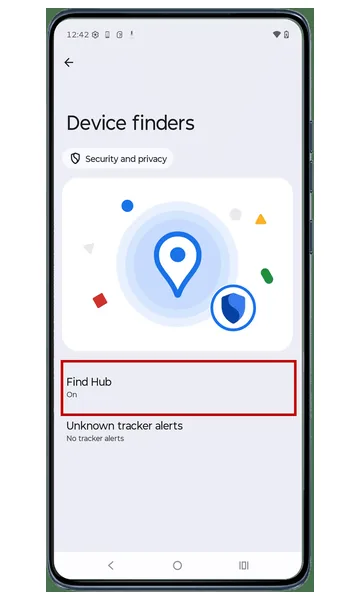 Step 4
Tap Find Hub
Tap Find Hub to open its settings.
-
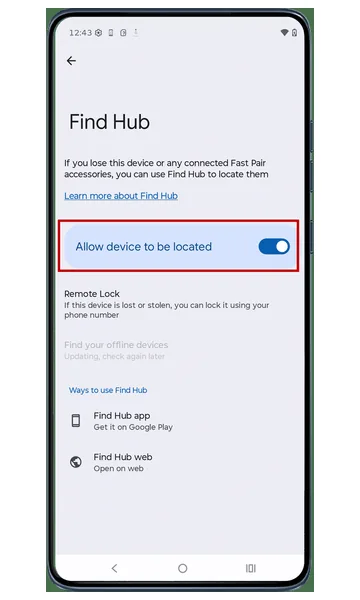 Step 5
Allow the device to be located
Make sure Allow device to be located is switched on. This lets you find your phone remotely if you lose it.
Locate your lost phone
-
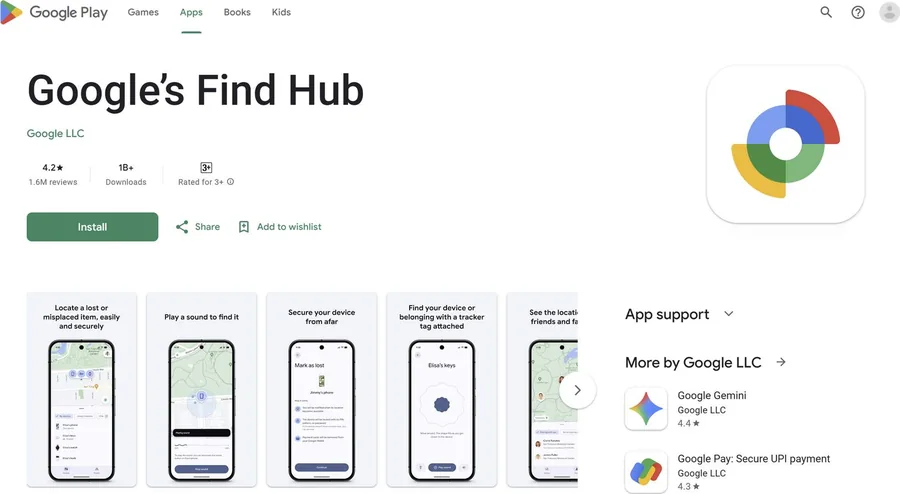 Step 1
Use the Find Hub app
On another phone or tablet, install Google’s Find Hub app from the Play Store and sign in with the same Google account as your lost phone. Select your phone to see it on a map. If it’s nearby, make it ring; if it’s far away, you’ll see its last known location.
-
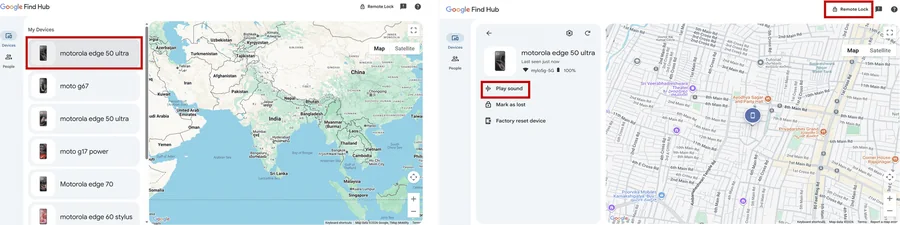 Step 2
Or use the web
Go to android.com/find (or search “find my device” on Google) and sign in to your Google account. Select your Motorola phone to see its location, and ring, lock or erase it remotely.
Tip: Only erase the phone if you’re sure you won’t get it back — after erasing, you can no longer locate it.
If your phone is stolen
- Lock the phone from Find Hub and show a message with a contact number.
- Report the theft to the police and share the last known location — don’t try to recover it yourself.
- Ask your mobile operator to block the SIM, and report the IMEI on the government CEIR portal (ceir.gov.in) to block the phone.
- Change your Google account password and other important passwords from a safe device.
Frequently asked questions
Can I find my Motorola phone if it is switched off?
Find Hub shows the last known location when the phone was online. Some newer phones can also be found while offline through the Find Hub network if that option is turned on.
Is Find Hub the same as Find My Device?
Yes. Google renamed Find My Device to Find Hub. The app and android.com/find work the same way.
Can I track my phone using its IMEI number?
You can’t track it yourself with the IMEI, but in India you can report a lost or stolen phone’s IMEI on the CEIR portal (ceir.gov.in) to block it on all networks and help police trace it.
Still having problems? It may be a hardware fault. Check the Motorola spare part prices for your model, or compare battery and display replacement costs.
Related Motorola guides
- Is My Motorola Phone Hacked? How to Check and Remove Malware
- Forgot Your Motorola Unlock PIN, Pattern or Password? How to Reset It
- How to Turn On (and Off) Developer Options on a Motorola Phone
- Moto Secure: Motorola Security and Privacy Settings Explained
- How to Start a Motorola Phone in Safe Mode
Steps and screenshots based on Motorola's official Lost phone tutorial. Steps can vary slightly by model and Android version.