How to Reset Network Settings on a Motorola Phone
Resetting network settings restores Wi-Fi, mobile data and Bluetooth to their defaults. It often fixes connection problems like dropped Wi-Fi, slow or missing mobile data, call drops and Bluetooth pairing issues — without touching your apps, photos or files.
When to reset network settings
- Wi-Fi issues: Wi-Fi not working, or network names not showing.
- Mobile data problems: no signal or missing signal icon, can’t make or receive calls, or calls drop often.
- Bluetooth issues: Bluetooth won’t connect or keeps disconnecting.
- VPN problems: VPN connection doesn’t work as expected.
What gets removed
- All saved Wi-Fi networks and passwords
- All mobile network settings
- All paired Bluetooth devices (earbuds, car audio, speakers)
- All VPN configurations
-
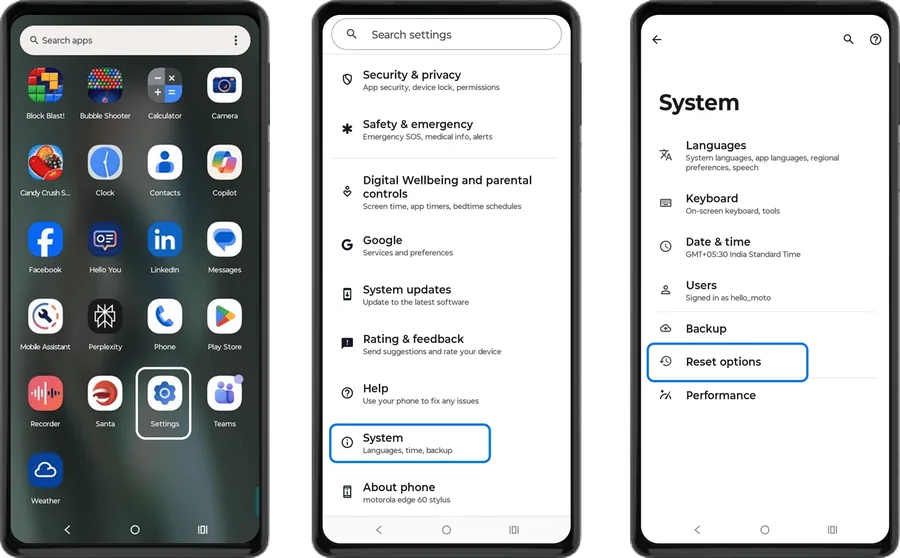 Step 1
Open Reset options
Open Settings, then go to System > Reset options (on some models, System > Advanced > Reset options).
-
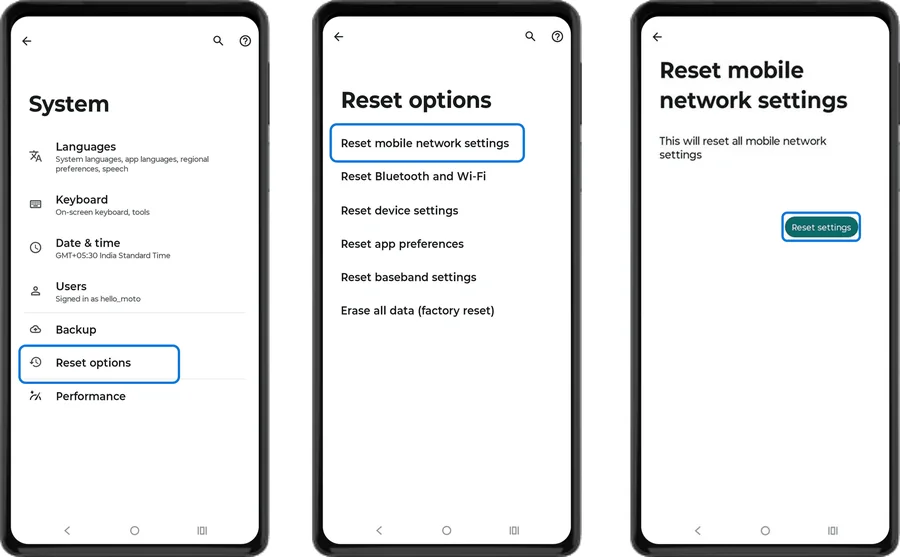 Step 2
Reset mobile network settings
Tap Reset Mobile Network Settings, then tap Reset settings to restore all mobile network settings to default.
-
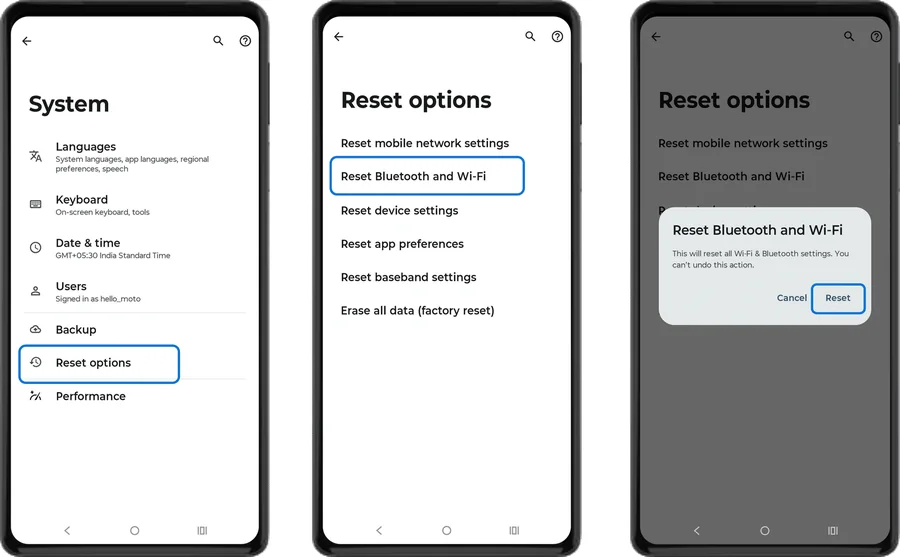 Step 3
Reset Wi-Fi and Bluetooth
Back in Reset options, tap Reset Bluetooth & Wi-Fi, then tap Reset. This removes all saved Wi-Fi networks and paired Bluetooth devices.
- Step 4
Reconnect
Reconnect to your Wi-Fi network, check mobile data is on, and pair your Bluetooth devices again. If you use it, set up hotspot (Internet sharing) and VPN again.
Frequently asked questions
Will resetting network settings delete my data?
No. Your apps, photos, contacts and files are not affected. Only saved Wi-Fi networks and passwords, mobile network settings, paired Bluetooth devices and VPNs are removed.
Can I reset only one connection, like Wi-Fi?
Motorola lets you reset mobile network settings separately from Wi-Fi and Bluetooth, but Wi-Fi and Bluetooth are reset together.
What if resetting network settings doesn’t fix the problem?
Restart the phone, re-insert the SIM card and update the software. If there’s still no signal or Wi-Fi, the antenna or motherboard may be faulty — check Motorola motherboard repair prices on this site.
Still having problems? It may be a hardware fault. Check the Motorola spare part prices for your model, or compare battery and display replacement costs.
Related Motorola guides
- How to Check Signal Strength on a Motorola Phone (and Fix No Signal)
- Motorola APN Settings for Jio, Airtel, Vi and BSNL (Internet & MMS)
- How to Start a Motorola Phone in Safe Mode
- Is My Motorola Phone Hacked? How to Check and Remove Malware
- Lost Your Motorola Phone? How to Find, Lock or Erase It
Steps and screenshots based on Motorola's official Reset network settings tutorial. Steps can vary slightly by model and Android version.